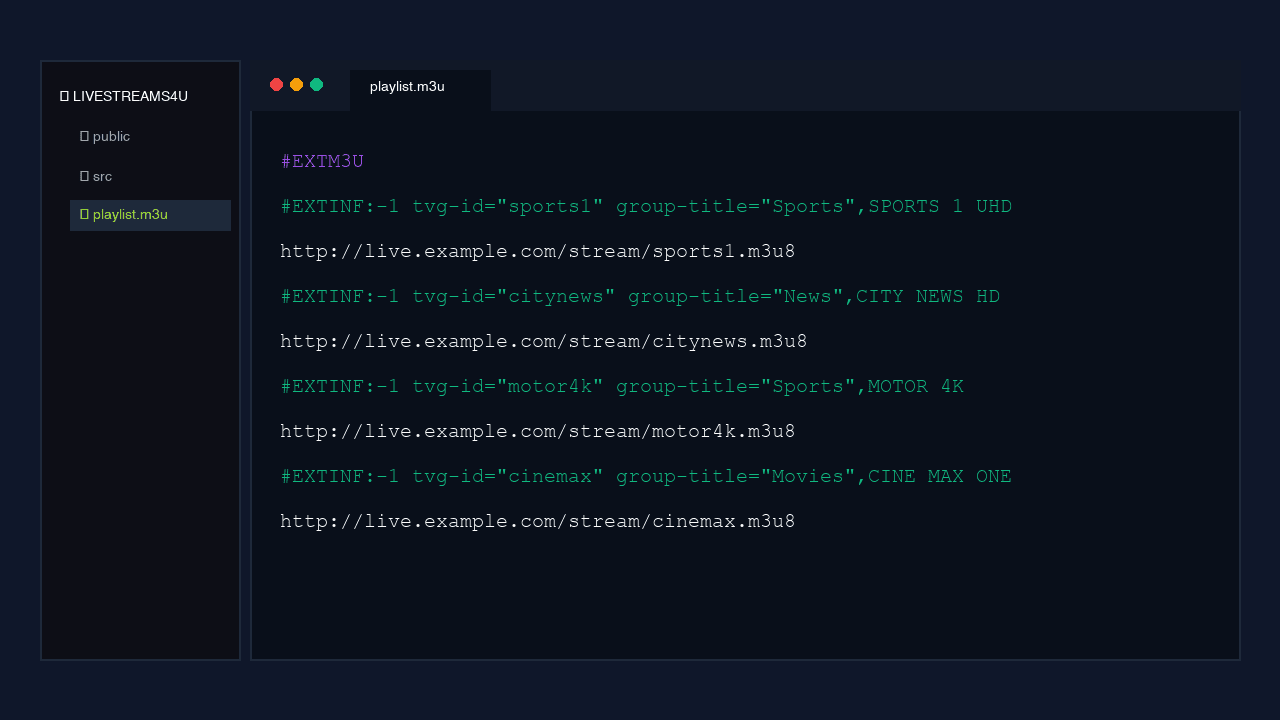
Open an M3U file in Notepad and the mystery evaporates. There is no video in it, no compression, no clever engineering. It is a text file listing channel names and web addresses, and that is the entire reason the IPTV industry runs on it.
What is actually inside an M3U file?
An M3U playlist is a plain-text index. It opens with a single header line, then repeats a two-line pattern for every channel: one line of metadata, one line pointing at the stream. Your player reads it top to bottom and builds a channel list from it.
The header is always #EXTM3U. Then each channel looks roughly like this: an #EXTINF line carrying the display name, the logo URL and a group tag, followed immediately by the address the player should open when you click it.
#EXTM3U— the header. Tells the player what kind of file this is.#EXTINF:-1 tvg-name="..." tvg-logo="..." group-title="..."— one channel's metadata. The group tag is what builds your Sports / News / Kids folders.- The next line — the actual stream URL. This is the part that matters and the part that breaks.
- Repeat for every channel. A 20,000-channel line is simply that pattern 20,000 times.
The name is a fossil. M3U stands for "MP3 URL" — Nullsoft invented it in the nineties so Winamp could queue up songs. Nobody designed it for television. It won because it was already everywhere and trivially simple to parse.
Why does every IPTV player use M3U?
Because it is an open format that nobody owns. Any developer can write an M3U parser in an afternoon, so every player supports it, and that universality is worth more to you than any feature a proprietary format could offer.
Here is what that buys you in practice: your line is portable. The same URL loads in VLC on a laptop, TiviMate on a Fire TV, and SS IPTV on a Samsung panel. You are not locked into one company's app, and you are not stranded when that app stops being updated.
Is there such a thing as an "HD M3U"?
No, and it is worth being blunt about it. "IPTV HD M3U" gets searched constantly, but the phrase describes something that cannot exist. The M3U file contains no video whatsoever. It has no resolution, no bitrate and no quality of any kind.
The quality lives entirely in the streams the addresses point at. An M3U listing 4K sources is a "4K M3U"; the same file with the addresses swapped for 480p sources is identical in every technical respect. Providers advertise "HD M3U" because people search for it, not because it means anything.
What you should actually ask about is the source behind the link: what bitrate the channel carries, whether there is a backup source when it fails, and what happens at peak. Those questions have real answers. "Is your M3U HD?" does not.
Why do free M3U playlists stop working?
Because the addresses inside them go stale, and nobody is being paid to fix them. This is the single most important thing to understand about M3U files, and it explains almost every bad IPTV experience people have had.
A public M3U is a snapshot of stream addresses that were working when someone collected them. Streams move. Sources get pulled. The list does not update itself — it is a text file, it has no intelligence. Within days a meaningful share of those links point at nothing.
The failure is also predictable in its timing, which is what makes it so infuriating. Free lists break hardest exactly when something popular is on, because that is when the source they were scraped from is under the most load. You do not notice on a quiet Tuesday. You notice at kick-off.
| Public / free M3U | A maintained paid line | |
|---|---|---|
| What it is | A snapshot of found addresses | A list pointed at infrastructure someone runs |
| When a source dies | The channel is dead until someone re-scrapes | Cut across to a backup source |
| At peak load | Fails first, fails hardest | Provisioned for the peak |
| EPG / guide | Rarely mapped, usually blank | Mapped across the lineup |
| Licensing | Unlicensed by definition | Licensed and accountable |
| Lifespan | Days | The length of your term |
None of this is a moral argument. It is a maintenance argument. Somebody has to keep thousands of addresses pointing at working sources, and that is a full-time job rather than a one-off act of generosity.
How do you load an M3U link?
Paste the URL into a player and wait. Every app does this slightly differently, but the shape is identical: find the "add playlist" option, paste the whole link, let the channels populate, then give the guide a minute to catch up.
- VLC: Media → Open Network Stream, paste, Play. Then Ctrl+L (Cmd+L on Mac) to see the list.
- IPTV Smarters: "Load Your Playlist or File/URL", paste, name it.
- TiviMate: Add playlist → M3U Playlist → paste the URL.
- SS IPTV on Samsung or LG: the TV needs the link format specifically — attach it to your connection code at ss-iptv.com.
M3U or Xtream Codes — does it matter?
Mildly. They deliver the same channels from the same line, just packaged differently. An M3U hands you one long URL with your credentials baked in. Xtream Codes splits the same information into a server address, a username and a password.
Xtream generally handles categories and the guide better in apps that support it, which is most Android and Fire TV players. M3U works in more places — VLC and Smart TVs need the link format specifically. Any decent provider sends you both and lets you pick.
What does M3U stand for?
MP3 URL. Nullsoft created the format in the nineties as a playlist file for the Winamp music player. It has nothing to do with television originally — IPTV adopted it because it was simple, open and already supported everywhere.
What is the difference between M3U and M3U8?
Encoding. An .m3u8 file is the same format saved as UTF-8, which means it handles non-English channel names correctly. In practice players treat them identically and you can ignore the distinction entirely.
Can I open an M3U file to see what is in it?
Yes. It is plain text — open it in Notepad or TextEdit and you will see the channel names and stream addresses. Be aware that your line's username and password sit inside those URLs, so never post the contents publicly.
Does an M3U playlist include the TV guide?
The M3U carries the EPG mapping, but the guide data itself downloads separately, which is why channels appear instantly and the guide fills in a minute later. VLC is the exception — it plays the streams but has no guide of its own.
Why does my M3U work on my phone but not my TV?
Usually the connection limit. If your plan allows one simultaneous stream and the phone is still playing, the TV gets refused. Close the other stream, or buy more connections. It is rarely the file.
The short version
An M3U is a text file listing channels and addresses. Its simplicity is why your subscription is portable across every player worth using, and its simplicity is also why a free one rots within days — there is no mechanism in a text file for keeping itself alive.
What you are paying for with a subscription is not the file. It is the person keeping the addresses inside it pointed at something that works at three o'clock on a Saturday. Our 20,000+ channel line ships as both an M3U link and Xtream login, delivered on WhatsApp in about ten minutes, with a 30-day money-back guarantee if it does not hold up on your connection.
Still not sorted?
Send us a photo of your screen on WhatsApp and tell us the device. Someone is on shift right now, and most of these are fixed inside ten minutes.